·12 min read
CarCAN: Turning Live Vehicle Data into a Personalisable Digital Cockpit
CarCAN, which I'm building on my own as my graduation thesis, brings an original Qt 6 cockpit on a Raspberry Pi, a Python telemetry service over SocketCAN and wired Android Auto together on one screen. It has been tried against real ECU responses on a Fiat Egea, and development continues.
Graduation thesis
Graduation thesis: a Linux-based in-vehicle infotainment and telemetry system
A digital cockpit that brings live vehicle data, personalisable gauges and phone navigation together on one screen, running on a Raspberry Pi.
Raspberry Pi 4 · Qt 6 / C++ / QML · Python + SocketCAN · wired Android Auto
A working prototype, tried against real ECU responses on a Fiat Egea. Development continues, with more features on the way.
Mission specs
- Type
- Solo graduation thesis · working prototype, still in development
- Hardware
- Raspberry Pi 4 (Linux) · 1600 × 600 touchscreen · dual-channel CAN HAT
- Interface
- An original cockpit in Qt 6 · C++ · QML
- Telemetry
- Python service · Linux SocketCAN · OBD-II Mode 01 · local WebSocket
- Live fields
- RPM, speed, coolant, engine load, intake pressure (MAP), air flow (MAF), run time
- Phone
- Wired Android Auto · Telemetry / Side-by-side / Android Auto views
- Personalisation
- 7 gauge families × 7 colours = 49 options · settings persist
- Verification
- Real ECU trials on a Fiat Egea · 162 Qt checks each on Windows and the Pi · 63 Python tests
Mission log
Every change to the project is logged here with its date, newest first.
- Site
Project page published: architecture, the data-accuracy approach, real vehicle and phone trials, the design process and the roadmap. Development continues.
- Interface
Final visual pass: large backgrounds went black and panels neutral dark grey, leaving colour on the gauge and thin accents. 162 Qt checks passed each on Windows and the Raspberry Pi.
- Tests
63 Python tests passed in the telemetry checks.
- Vehicle
Fiat Egea vehicle session: all seven fields were read from real ECU responses. In short windows, about 7.3–7.4 queries/s in total, ~3.9 RPM and ~1.9 speed readings/s, with no timeouts or RX loss.
Image records
Real device and hardware
Seven gauge families · UI test, synthetic data
Personalisation
Diagrams
Design research · early prototypes, demo data
Next steps
- Find the highest stable ECU read rate on the Egea by experiment
- Measure measurement-to-screen latency stage by stage (p50 / p95)
- Add new PIDs (e.g. fuel level) once verified
- A Toyota Corolla 2021 1.8 Hybrid profile
- More phones; audio, microphone and long-run load tests
- Research into wireless Android Auto and CarPlay
Technical report
Architecture, hardware and software in detail.
Introduction: more than a tachometer
CarCAN is a digital cockpit running on a Raspberry Pi that I'm building on my own as my graduation thesis, titled A Linux-Based In-Vehicle Infotainment and Telemetry System. It combines three things on one physical screen:
- Fresh telemetry read from the vehicle: engine speed, road speed and five supporting engine values.
- Personalisable gauges: seven design families, each in seven colours.
- The phone's wired Android Auto projection, so navigation sits on the same screen.
The goal was never just to draw a good-looking tachometer, but to build a software foundation that can be adapted to different vehicle profiles. That is why the data source is separated from the interface, and no unverified vehicle feature is put on screen.
Status: a working prototype. Real-vehicle verification was done on a Fiat Egea. Work continues on measurement, compatibility and user experience, with new features on the way, and this page will be updated as the project moves forward.
🎯 The starting point: information you can read at a glance
Being able to read a vehicle's measurements isn't enough to turn them into a good cockpit. Which data is fresh, whether the unit comes across correctly, what to show when the connection drops, and how navigation and gauges share the screen are all part of the same design. CarCAN treats these questions together.
The aim is a layout you can live with in the car. Instead of a separate page per measurement, the main gauge and supporting values share one surface. Personalisation never gets in the way of the essentials: every appearance option is managed from a single settings panel.
✅ What works today
The normal live stream has seven fields. On the verified Egea profile they are read by discovering which fields the ECU supports and decoding its real responses:
| Field | Unit | Note |
|---|---|---|
| Engine speed | RPM | The visual focus: a needle or a filling ring |
| Vehicle speed | km/h | A real zero is kept apart from missing data |
| Coolant temperature | °C | Not to be confused with oil temperature |
| Engine load | % | Not throttle pedal position |
| Intake pressure (MAP) | kPa | Intake manifold absolute pressure |
| Air flow (MAF) | g/s | Mass air flow |
| Run time | s | Engine run time, not distance travelled |
Every field needs ECU support and current, valid data; no field is assumed to exist on every car. Names and units are kept deliberately: engine load isn't shown as "throttle", and run time isn't shown as "trip". The design doesn't change what the data means.
🗺️ One screen, three layouts
The screen is 1600 × 600 pixels, and you can switch between three layouts:
- Telemetry: the gauge and supporting values use the whole screen.
- Side-by-side: the phone and telemetry sit next to each other, with telemetry on the left or right. The telemetry area is 796 × 600.
- Android Auto: the phone projection uses the whole surface.
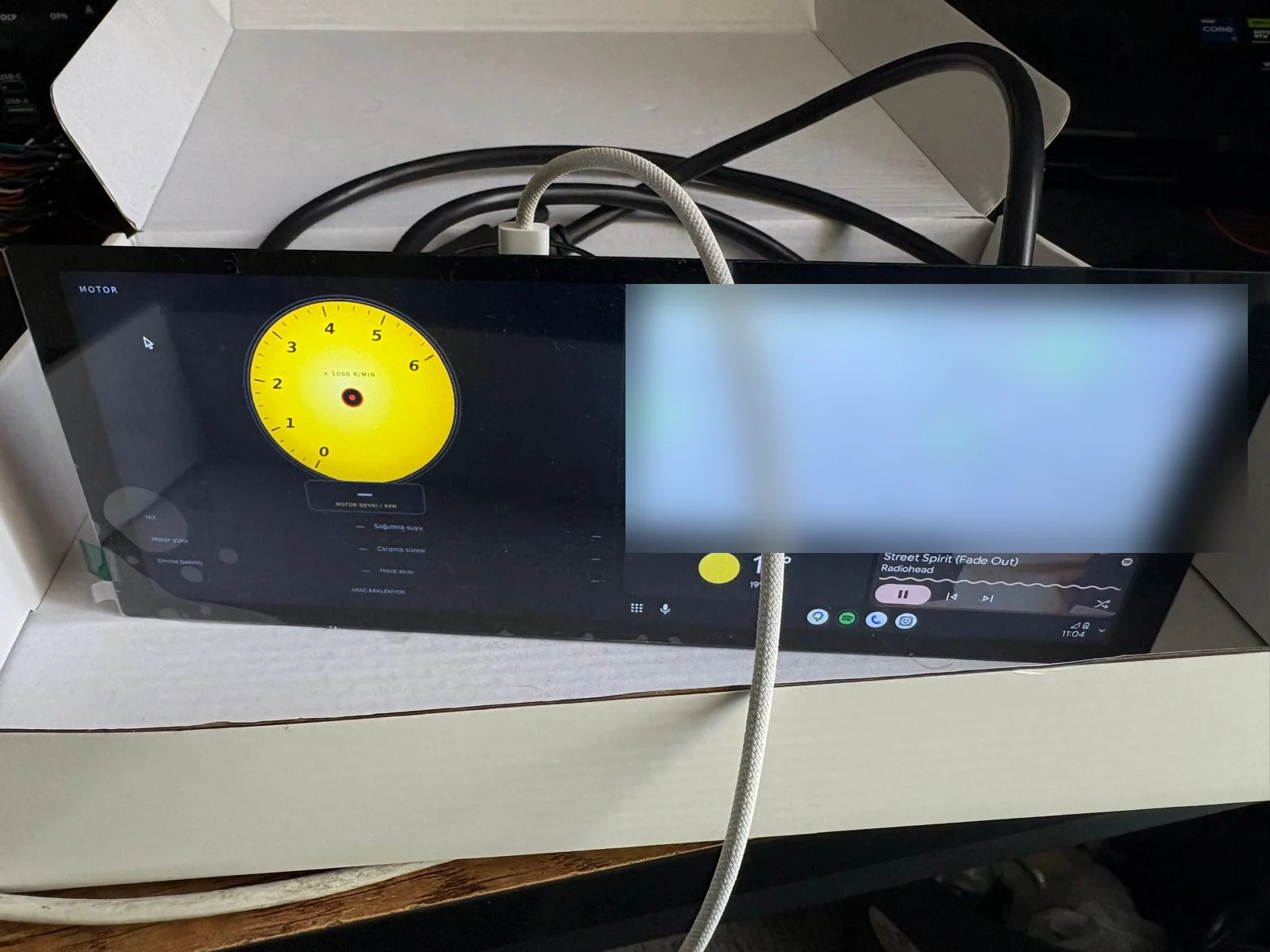 Side-by-side view on the real device: CarCAN on the left (waiting for the vehicle), wired Android Auto on the right. The map is blurred because it shows a location.
Navigation arrives over wired Android Auto. Google Maps runs on the phone; it isn't embedded as a separate web map or map component. The phone's video and control flow are carried into the Qt application through a receiver layer.
On the receiver side, CarCAN builds on the open-source LIVI project. CarCAN's main interface is not an extended LIVI or Electron app; it is the project's own Qt/C++/QML cockpit. The LIVI integration is handled as a separate layer, keeping its source and licence notices intact.
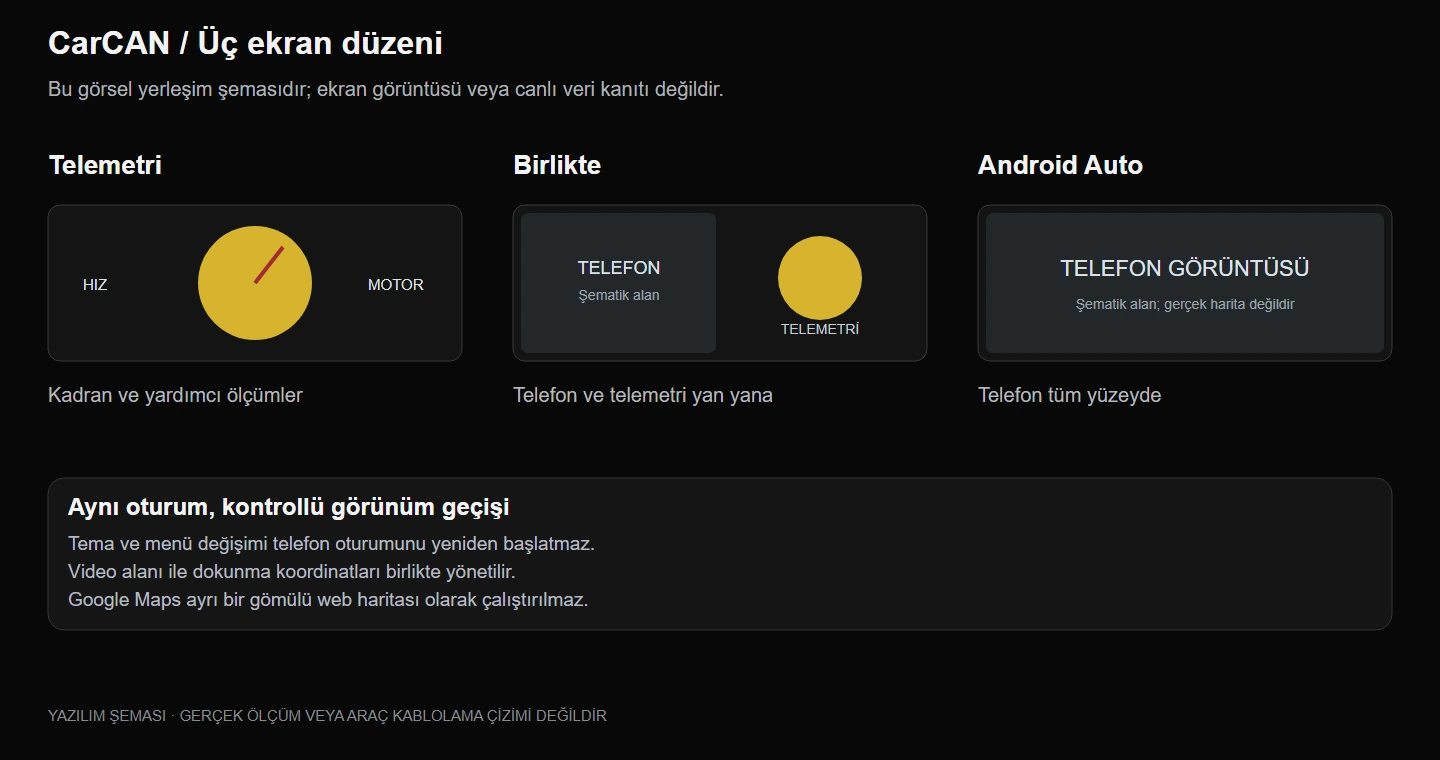 Three layouts: Telemetry, Side-by-side and Android Auto. A layout diagram, not a screenshot.
👆 Keeping the phone session alive while the layout changes
One of the hardest parts of running Android Auto alongside a native cockpit is keeping the phone session alive when the layout changes. Switching views shouldn't re-establish the USB connection every time. So area confirmation, video focus and the order of returning to the native interface are managed as separate states.
The second problem is touch. If the video is placed in one area while touches are sent using the old area's coordinates, the map is visible but responds in the wrong place, or not at all. In CarCAN, the confirmed video area and the inverse touch transform are derived from the same geometry. When the menu opens, ongoing touches are cancelled, and the touch that closes the menu is checked so it never leaks through to the map.
In physical trials with a POCO X4 GT, one-finger drag, two-finger zoom, unplugging and replugging USB, and switching between full and side-by-side views were all verified. That is not a guarantee for every Android phone or every condition, and the physical phone acceptance will be repeated after the latest visual changes.
🎨 Seven gauge families, 49 colours
The current interface has seven gauge families: Classic, Sport, Race, GT, Wing, Track and Ring. Each comes in seven colours, for 49 family–colour combinations. These aren't 49 separate designs: the family and the colour are independent choices.
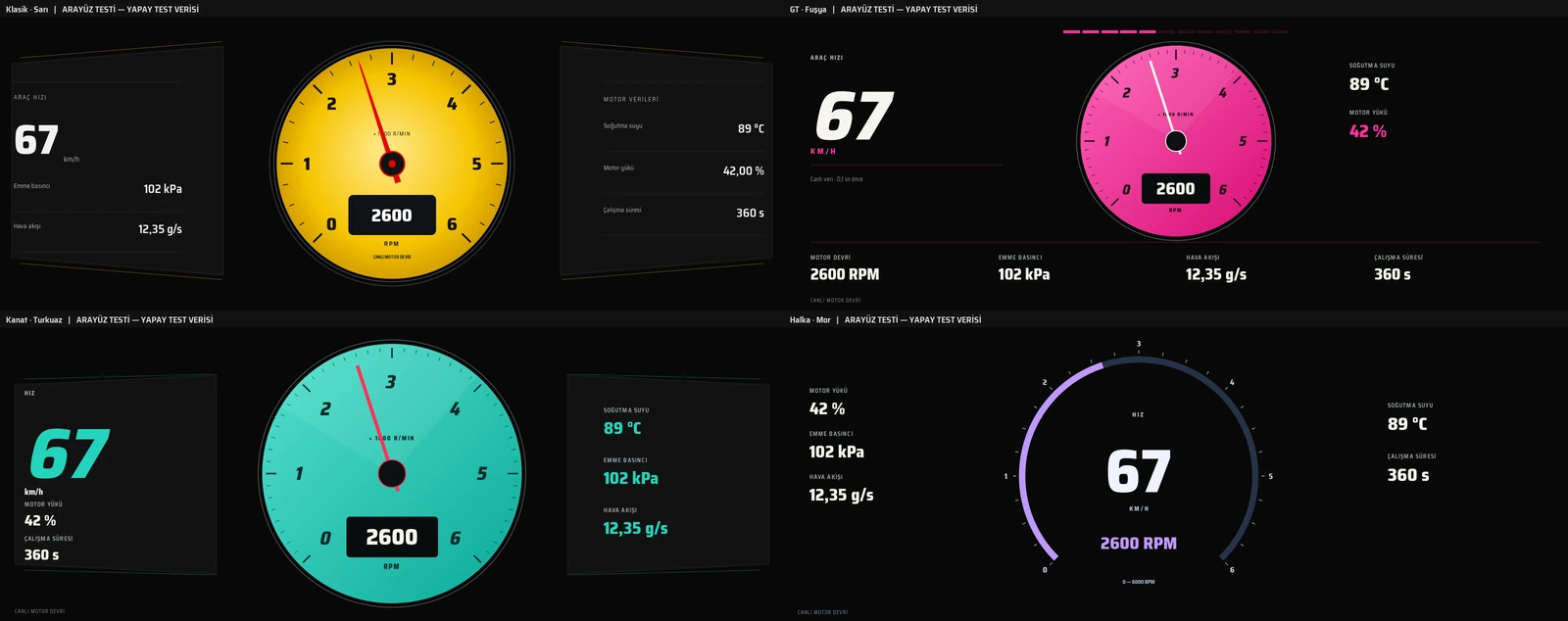 Current Classic, GT, Wing and Ring families. The numbers are synthetic UI test data, not vehicle measurements.
- Classic and Sport keep the familiar needle-gauge language.
- Race has a bold character with a large speed readout and a coloured dial.
- GT combines a central gauge with side information panels.
- Wing blends the gauge with panels on either side.
- Track offers a different information layout; the name doesn't mean lap timing exists.
- Ring shows engine speed as a filling arc.
Changing the colour doesn't change the typeface, text sizes or the gauge's layout. Options such as a plain or carbon surface for GT and Wing, or the information position in GT, are stored separately, so someone who only wants a new colour isn't accidentally moved to another layout. Preferences survive an app restart.
🏗️ Architecture: two independent paths, one cockpit
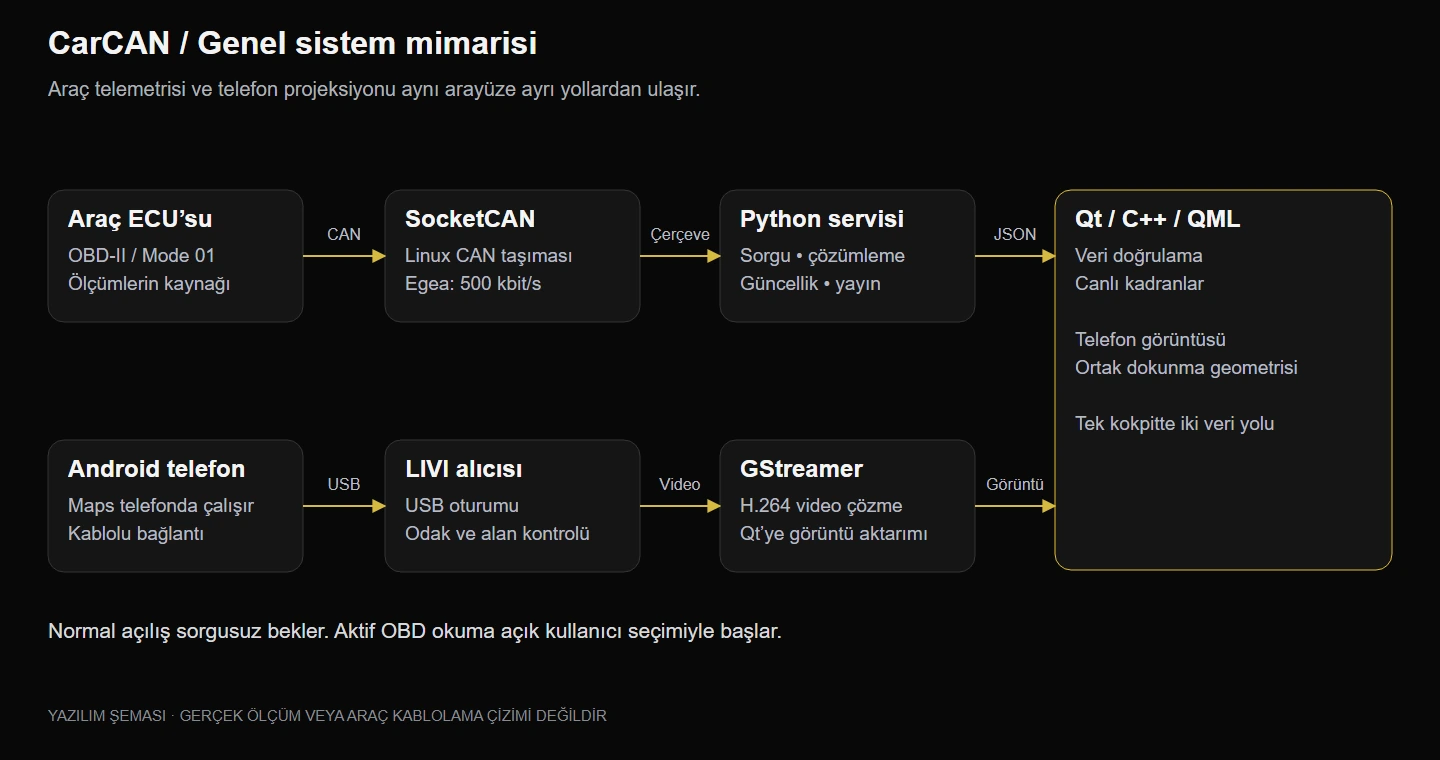 System architecture: vehicle telemetry and phone projection reach the same interface by separate paths. A software diagram, not a wiring drawing.
The vehicle data path relies on an independent Python telemetry service starting at Linux SocketCAN. The service discovers supported PIDs per ECU, runs a controlled read plan, decodes the responses and publishes the current state over a local WebSocket. ECU, PID, unit and timing travel with the data.
The C++ layer validates each incoming packet's source, sequence, format and field consistency, and QML components draw the validated current state. Every gauge uses the same validated data model; no gauge has its own vehicle reader.
The phone path is separate: the USB session, receiver processes, H.264 decoding with GStreamer, and presenting the video on a Qt surface. Connecting a phone does not start the vehicle reader. Keeping the two paths apart is one of the key decisions that stops a layout choice from disturbing CAN queries or the phone session.
| Layer | Job |
|---|---|
| Vehicle ECU / OBD-II | The source of real measurements, standard Mode 01 responses |
| Linux SocketCAN | CAN transport; monitoring bus and loss conditions |
| Python service | ECU support, controlled query plan, decoding, freshness and publishing |
| Local WebSocket | Delivering the latest state to the interface |
| C++ validation and session | Source, sequence, unit, range, timing and lifecycle |
| QML | Drawing the different gauges from a shared data model |
| LIVI receiver infrastructure | Wired phone session and projection control |
| GStreamer / Qt video | H.264 decoding and presenting the video on a Qt surface |
🧪 Data accuracy: showing that data is missing matters as much as showing it
CarCAN never fills gaps with fake zeros or guessed gear values. When no fresh measurement arrives from the vehicle, the number is hidden and "—" is shown instead. A measured zero, however, is a valid value: a parked car reading zero speed is different from not receiving speed at all.
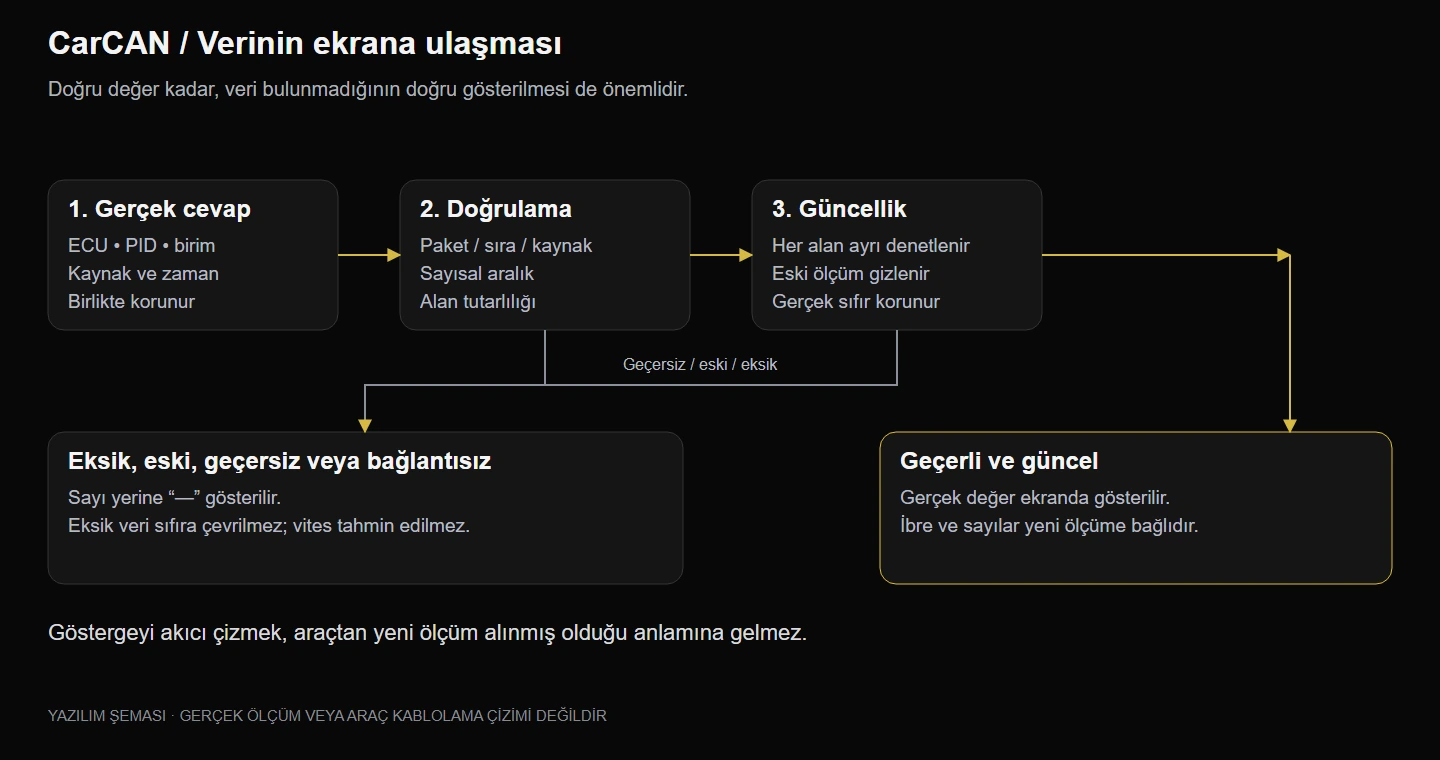 How data reaches the screen: valid, fresh values are shown; missing, stale or invalid data becomes "—".
On the publishing side, old states are never allowed to pile up for slow clients; only the newest state is kept. Not leaving an old reading on screen as if it were fresh matters as much as moving the needle.
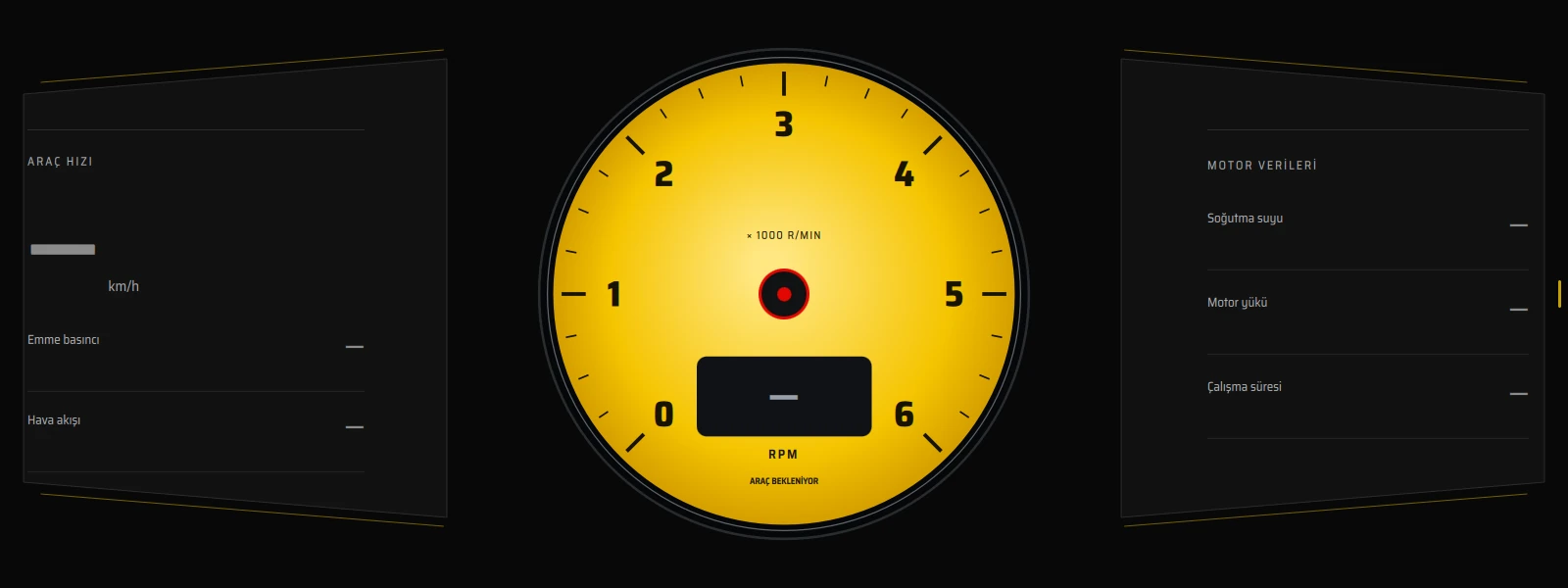 A real screenshot from the Raspberry Pi in query-free standby. With no vehicle data, dashes are shown instead of numbers.
Controlled reading
The normal start-up is query-free standby: no OBD query is sent to the vehicle until the user explicitly starts reading. Active reading isn't passive listening; it sends limited Mode 01 read queries to the ECU. CarCAN isn't designed as a vehicle configuration or control tool: writing to the ECU, actuator commands and clearing fault codes are out of scope.
The current Egea profile's limits:
| Setting | Value |
|---|---|
| Total query budget | At most 8 queries/s |
| Outstanding queries at once | 1 |
| Response timeout | 250 ms |
| Safe stop | Querying stops after 5 consecutive missed responses or a related CAN/RX error |
These are the limits of the software profile in use, not the ECU's physical capacity or a shared limit for every car. The 8 queries/s budget is shared across all fields, so no single sensor is read 8 times a second.
⚡ Smooth drawing
Rather than redrawing the fixed tick marks and dial face on every RPM change, static drawing is separated from dynamic elements. The needle, ring fill and text change while the static face is kept; when the colour, scale or surface size changes, the relevant static drawing is regenerated.
Automated checks across all seven families verified that 40 consecutive RPM updates don't repaint the main face, that the final number updates correctly, and that colour, scale and size changes trigger the drawing they need. This test doesn't measure real screen FPS or vehicle-to-pixel time, and smooth drawing doesn't mean the vehicle is being measured more often.
🚗 What real vehicle and phone trials taught me
24 October 2026 · Fiat Egea. All seven fields were read from real ECU responses. Under the current profile, in short observation windows:
- About 7.3–7.4 queries/s in total
- About 3.9 readings/s for engine speed and about 1.9 readings/s for vehicle speed
- No timeouts or RX loss in those windows
These are observations under those conditions, not a long-term guarantee or the ECU's maximum rate.
Additional data research. Extra PID trials got responses for more standard data packets. Candidates such as fuel level and barometric pressure were examined but haven't been added to the normal seven-field stream yet. A full response from a PID doesn't mean every item in the packet is a verified sensor reading; a new field needs decoding, validity checks and on-vehicle comparison.
What wasn't found. Labelled passive trials for indicators/hazards and gear position couldn't verify a reliable ID/bit mapping. That doesn't prove the information isn't on the car anywhere; only that it wasn't found with the current connection and experiment. So the interface never shows unverified gear, fuel, tyre pressure, power/torque or lap time values.
🔬 Test approach: keeping kinds of evidence apart
| Evidence | What was verified |
|---|---|
| Automated Qt checks (26 Oct) | 162/162 on Windows and 162/162 on the Raspberry Pi: gauge/colour persistence, type and geometry consistency, full and compact layouts, data validity, static drawing cache, Android Auto entry and switching checks |
| Python tests (25 Oct) | 63 tests passed in the telemetry checks |
| Physical phone trial (24 Oct) | Touch, zoom, USB unplug/replug and view switches with a POCO X4 GT |
| Real vehicle trial (24 Oct) | Reading all seven fields from real ECU responses on a Fiat Egea |
Automated software checks don't replace real-finger, audio, long-run load or in-vehicle latency acceptance. Desktop verification, running on the Raspberry Pi, phone trials and vehicle trials are kept as separate kinds of evidence, so an unfinished test is never presented as done. Because short black frames were seen during earlier fast automated switching, there's no claim of "zero dropouts in every condition" either.
🔧 Hardware
- Raspberry Pi 4 running Linux
- A 1600 × 600 touchscreen, with the Pi mounted on its back
- A dual-channel CAN HAT (CAN_0 / CAN_1, 120 Ω termination jumpers) and a DB9 screw-terminal adapter for the CAN connection
- A wired USB connection for the phone
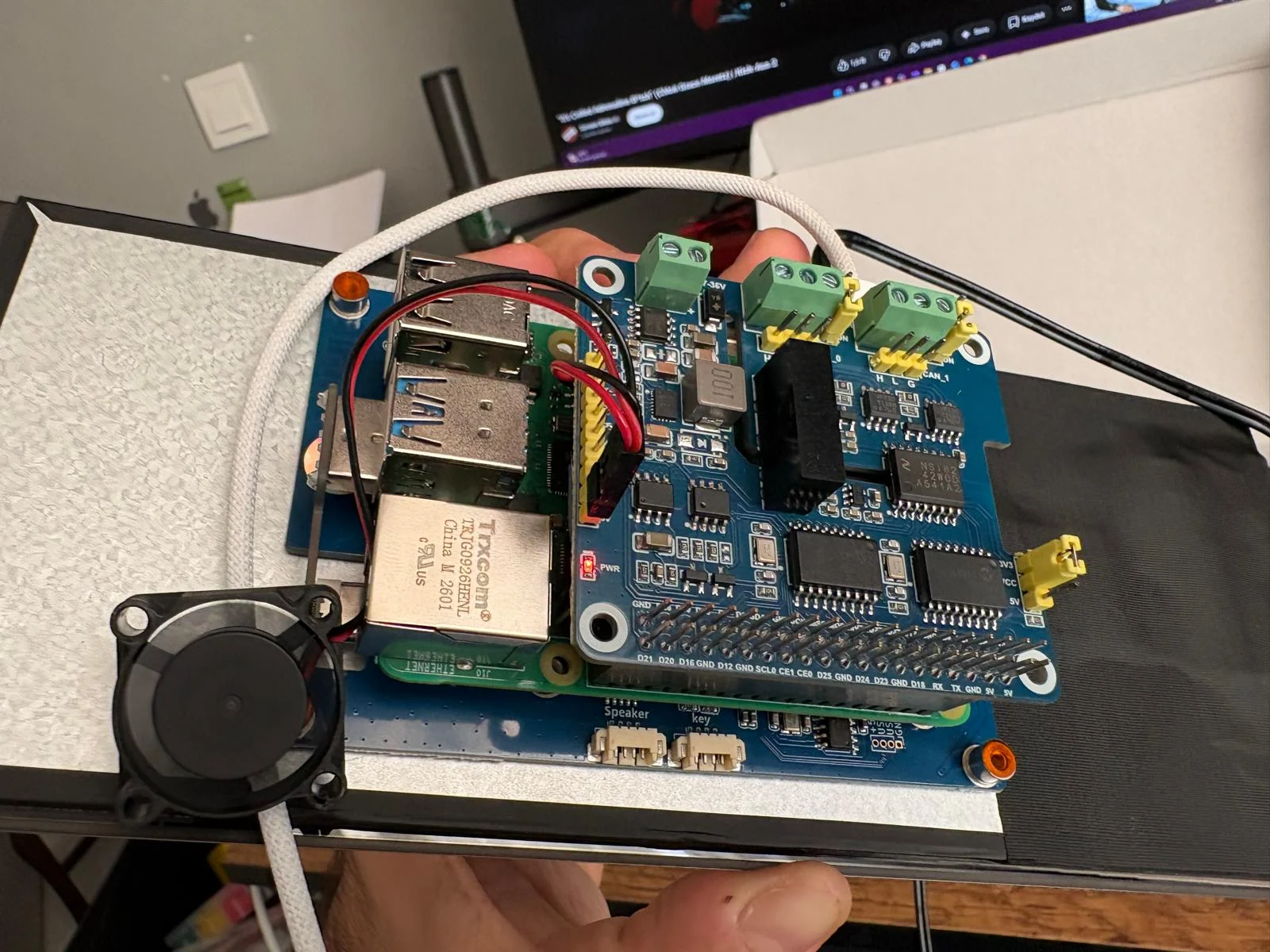 Behind the screen: the Raspberry Pi with a dual-channel CAN HAT and a cooling fan.
🧭 Design process: from prototype to Qt application
The first studies started with yellow gauge and track compositions, followed by red race, orange GT, turquoise wing and blue ring ideas. The chosen ideas were turned into real Qt components.
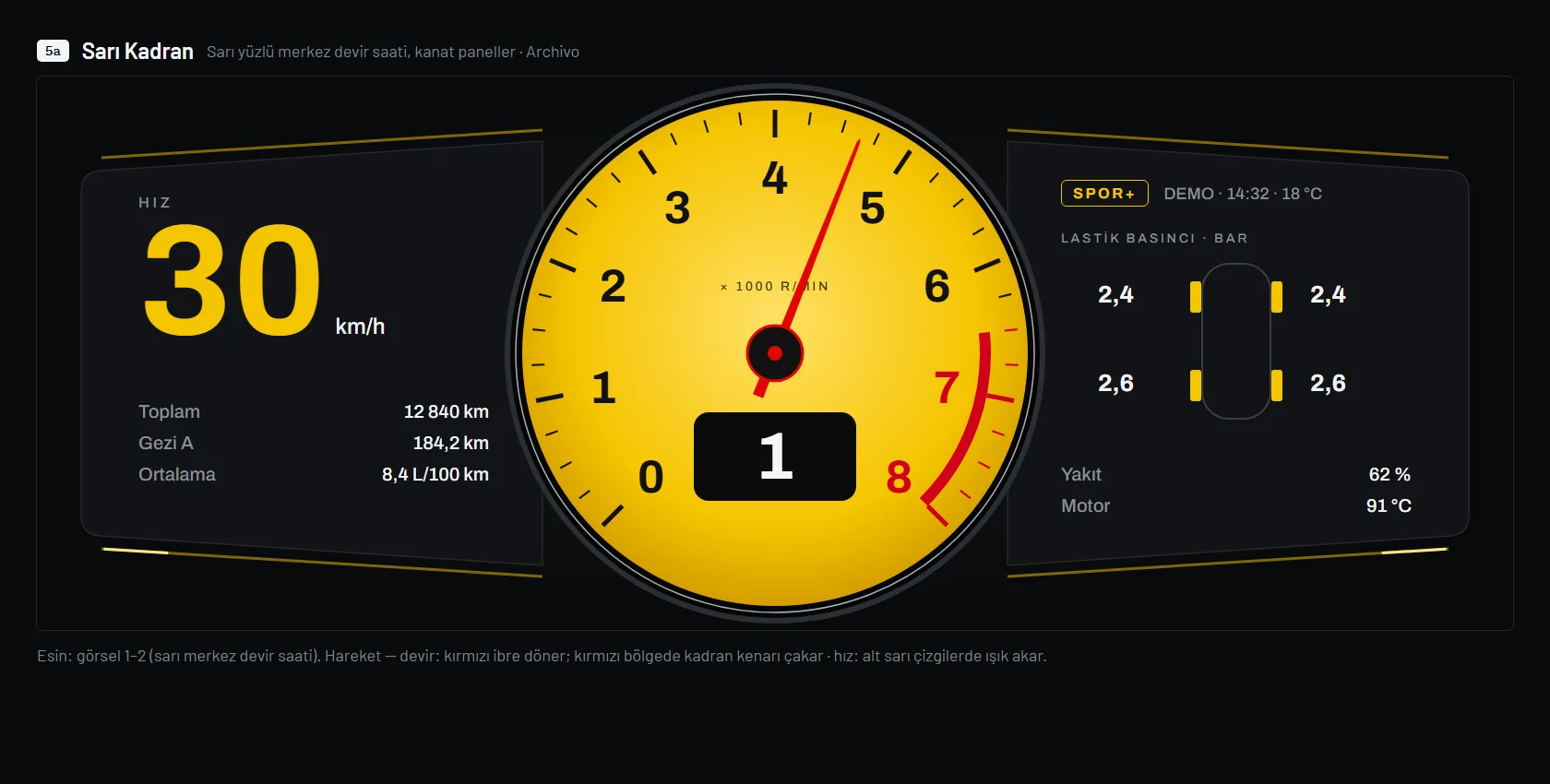 Early prototype: the first yellow gauge concept. Gear, fuel, tyre and similar values are demo design elements, not product features.
In the final layout, large backgrounds went black and panels and settings moved to a neutral dark grey; colour stayed on the dial face, the needle and thin accent lines. The aim was to stop big coloured surfaces from competing with the supporting information. The final pass reduced frame density and long accent lines, and Classic shows speed in white for readability. The interface uses the Saira Semi Condensed typeface bundled with the app, so text never depends on the operating system's font choice.
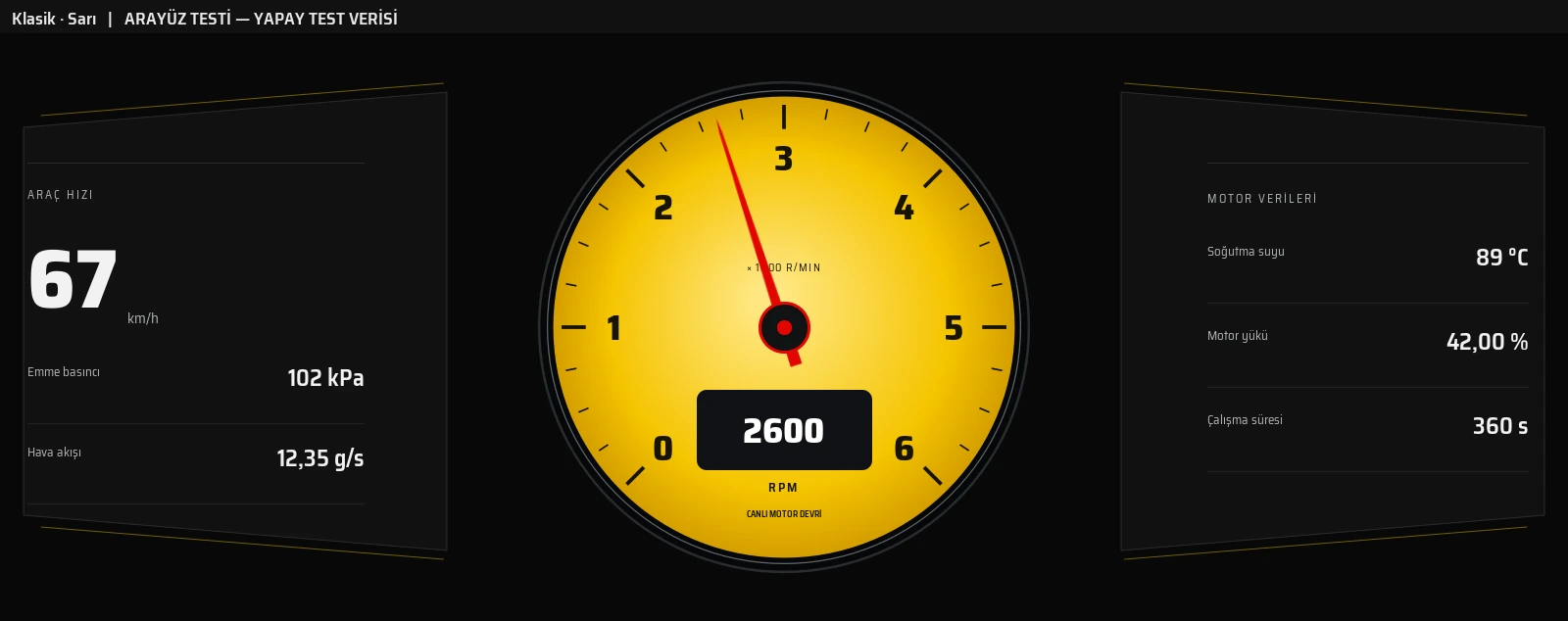 The current Classic gauge. The numbers are synthetic UI test data.
🛣️ Roadmap: what's next
The project continues, with plenty of new features and verification steps ahead:
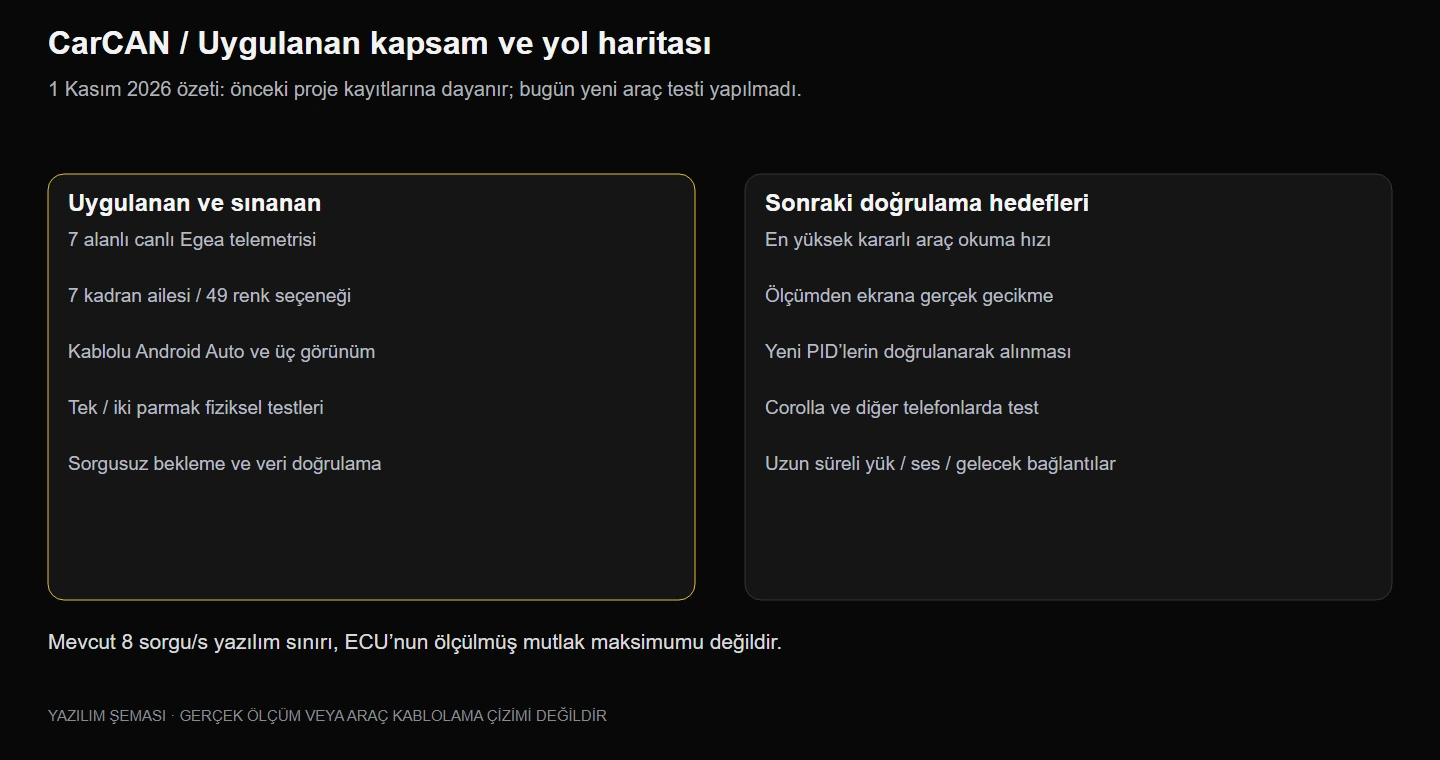 Implemented scope and roadmap (1 November 2026).
- Highest stable read rate: find, by experiment, the highest stable telemetry rate the Egea can deliver under test conditions. Trials above 8 queries/s will follow a separate, controlled test plan.
- End-to-end latency: time the ECU query–response, per-field reading rate, service publishing, Qt reception and real screen presentation separately, reporting p50, p95, worst case and error/loss counts.
- New data fields: add extra PIDs such as fuel level once they're decoded and verified on the vehicle.
- Toyota Corolla 2021 1.8 Hybrid: a second vehicle profile, not yet verified.
- Wider phone support, plus audio, microphone and long-run load tests.
- Wireless Android Auto and CarPlay: research topics for the future, not part of today's supported features.
The goal of broad compatibility means a growing set of profiles, each verified per vehicle; it isn't a claim that CarCAN works on every car today.
❓ FAQ
Does it work on every car? The architecture is designed to adapt to different vehicle profiles; today's real-vehicle verification is on a Fiat Egea. The Corolla target isn't verified yet.
Is Google Maps embedded in the app? No. The map runs on the phone and is projected over wired Android Auto.
Are the numbers in the images live? No. Values in the current interface images are labelled synthetic test data, and the early prototypes contain demo elements. The Raspberry Pi standby screenshot comes from the real device but contains no vehicle measurement. Maps in the real device photos are blurred because they show a location.
Does it show gear, fuel or tyre pressure? No. They aren't in the normal live feature list; appearing in prototypes doesn't mean they're implemented.
Has zero latency or the ECU's maximum rate been verified? No. The current software limits and short field observations are known; the maximum stable rate and real screen latency are the next measurement targets.
🎯 Conclusion
CarCAN brings embedded Linux, vehicle communication, data modelling, a visual interface and phone projection together in one working system. Design studies became real Qt components, display preferences were separated from the vehicle read path, and the first field experience was gathered from real ECU responses. This project showed me that a personalisable cockpit is about more than looks: it has to be built together with accuracy, state management and measurable performance.
Development continues; new trials and features will be added to the mission log at the top of this page.